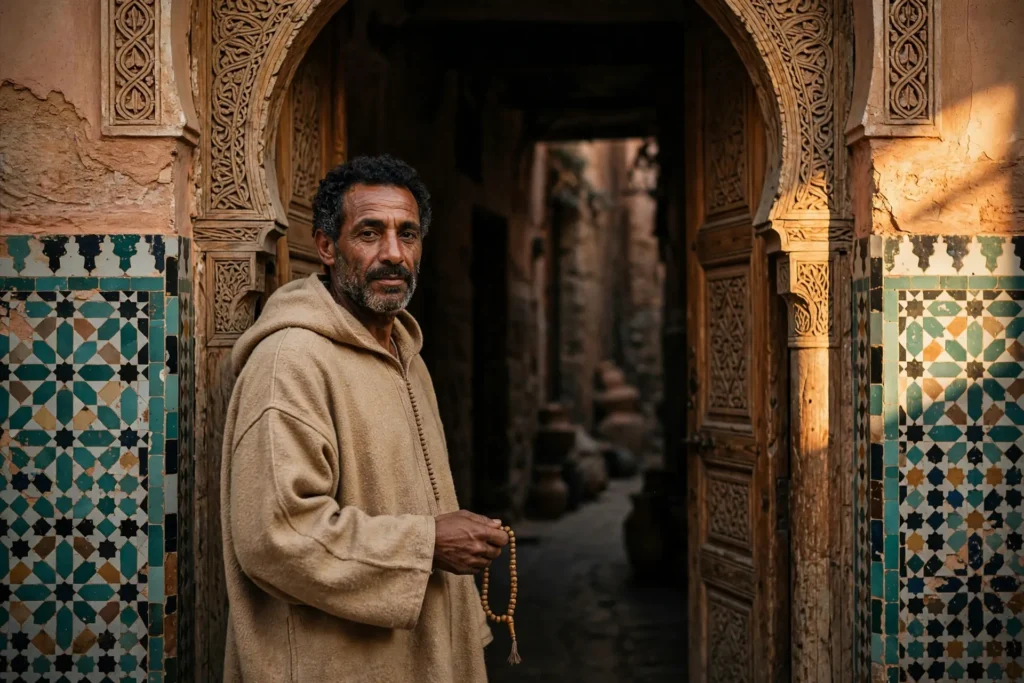
Looking for a copy-paste ready AI image prompt? Below is a complete, hand-crafted prompt for Moroccan Medina Portrait Prompt: Man in Djellaba Doorway, tuned for Stable Diffusion XL. Just copy the prompt, paste it into Stable Diffusion XL, and generate.
The Prompt
Atmospheric photorealistic portrait of a Moroccan man in his forties wearing a sand-colored wool djellaba with the hood resting on his shoulders, standing in an arched medina doorway. Warm late-afternoon sun rakes across ancient zellige tiles and carved cedar wood around him, deep shadows pooling in the corridor behind. He holds prayer beads loosely in one hand, calm weathered expression, eyes meeting the lens. Shot on a Fujifilm GFX look with a 50mm lens, shallow depth of field, earthy ochre and teal palette, intricate architectural detail, film-like grain, travel editorial mood, environmental portrait composition, ultra-detailed, 8k, sharp focus, authentic and respectful cultural photography.
Copy the prompt above and paste it directly into Stable Diffusion XL — no editing needed.
Recommended Settings
- Best tool: Stable Diffusion XL
- Aspect ratio: 3:2
Negative Prompt
blurry, low quality, watermark, distorted face, deformed hands, extra fingers, stereotyped, oversaturated, text
Add the negative prompt above in Stable Diffusion XL’s negative prompt field to avoid common artifacts.
How to Use This Prompt
- Copy — select the prompt text above and copy it.
- Paste into Stable Diffusion XL — open Stable Diffusion XL and paste the prompt into the prompt box.
- Set 3:2 — choose the 3:2 aspect ratio before generating.
- Generate and refine — run 2–3 variations and keep the best one.