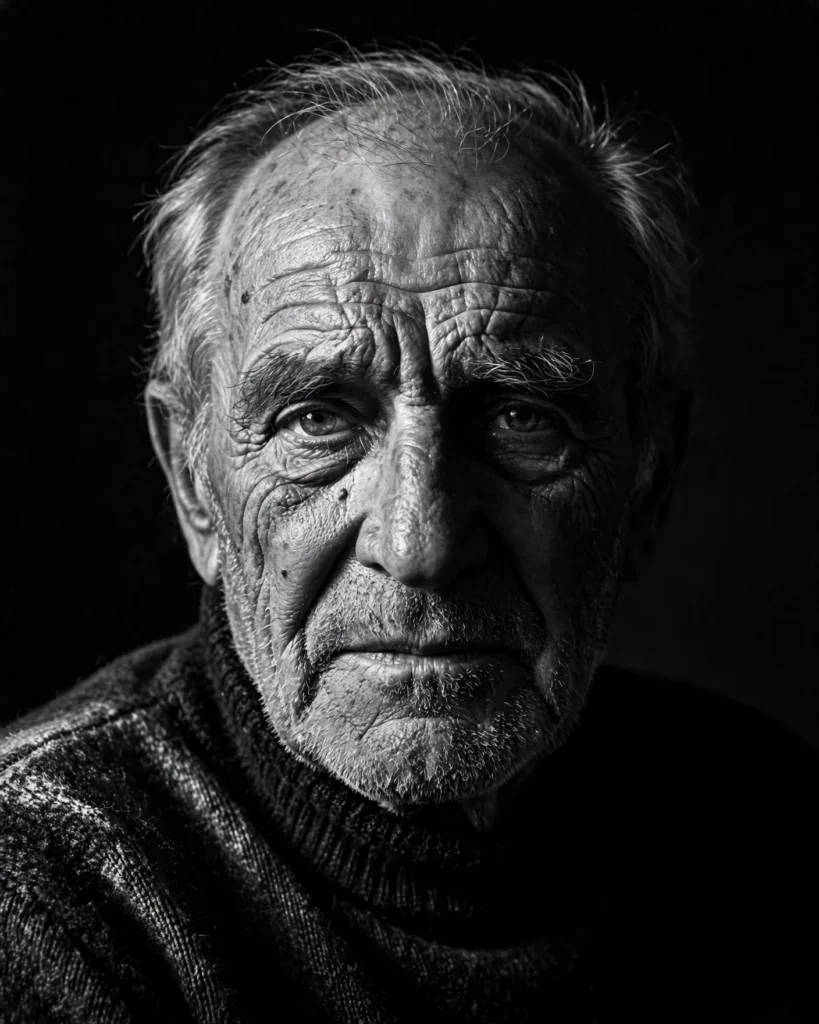
Looking for a copy-paste ready AI image prompt? Below is a complete, hand-crafted prompt for Moody Black-and-White Portrait Prompt: Elderly Man in Chiaroscuro Light, tuned for Flux. Just copy the prompt, paste it into Flux, and generate.
The Prompt
Dramatic black-and-white studio portrait of an elderly man in his seventies with deep facial wrinkles, a weathered brow and kind tired eyes, lit in classic chiaroscuro style. A single hard key light from the upper left carves his face out of darkness, leaving the right side falling into deep shadow, emphasizing every line and texture of his skin. He wears a dark wool turtleneck and looks directly into the lens with quiet dignity. Medium-format aesthetic, 80mm lens look, rich tonal range from pure black to soft silver highlights, fine film grain, crisp detail in the eyes, minimalist black background, tight head-and-shoulders framing, centered composition, ultra-detailed, high contrast, timeless fine-art portrait photography.
Copy the prompt above and paste it directly into Flux — no editing needed.
Recommended Settings


- Best tool: Flux
- Aspect ratio: 4:5
Negative Prompt
color, blurry, low resolution, watermark, distorted face, deformed ears, cartoon, oversharpened, flat lighting, noise
Add the negative prompt above in Flux’s negative prompt field to avoid common artifacts.
How to Use This Prompt

- Copy — select the prompt text above and copy it.
- Paste into Flux — open Flux and paste the prompt into the prompt box.
- Set 4:5 — choose the 4:5 aspect ratio before generating.
- Generate and refine — run 2–3 variations and keep the best one.