Looking for a copy-paste ready AI image prompt? Below is a complete, hand-crafted prompt for Wheat Field Farmer Portrait Prompt: Golden Sunset Harvest, tuned for Flux. Just copy the prompt, paste it into Flux, and generate.
The Prompt
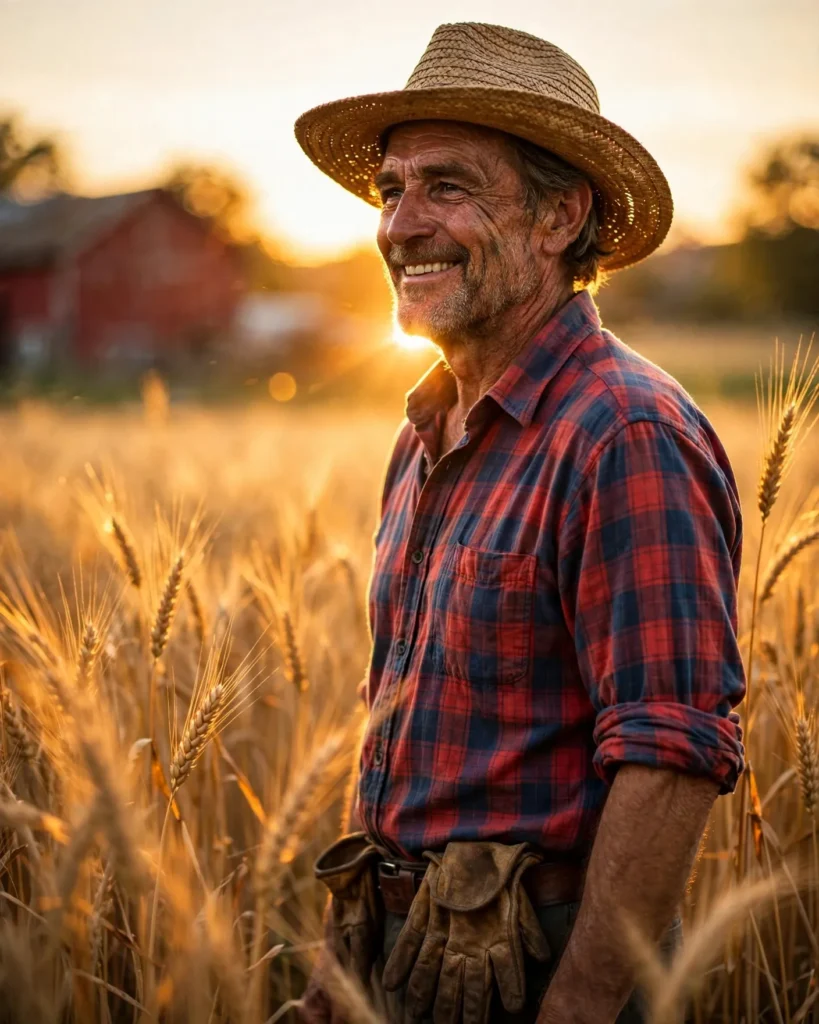
Photorealistic portrait of a rugged male farmer in his fifties standing in a ripe wheat field at sunset, a straw hat shading his eyes, sun-creased smile, plaid shirt with rolled sleeves and worn work gloves tucked in his belt. Low golden sun flares softly behind his shoulder, wheat ears glowing translucent amber around him, a red barn blurred in the far distance. Shot on a Nikon Z8 with an 85mm f/1.8 lens, shallow depth of field, warm honey and gold palette, gentle breeze moving the wheat, authentic weathered skin detail, honest hardworking expression, rule-of-thirds composition, ultra-detailed, 8k, sharp focus, rural lifestyle portrait photography, warm and dignified mood.
Copy the prompt above and paste it directly into Flux — no editing needed.
Recommended Settings

- Best tool: Flux
- Aspect ratio: 4:5
Negative Prompt
blurry, low quality, watermark, distorted face, deformed hands, extra fingers, oversaturated, cartoon, text errors
Add the negative prompt above in Flux’s negative prompt field to avoid common artifacts.
How to Use This Prompt


- Copy — select the prompt text above and copy it.
- Paste into Flux — open Flux and paste the prompt into the prompt box.
- Set 4:5 — choose the 4:5 aspect ratio before generating.
- Generate and refine — run 2–3 variations and keep the best one.