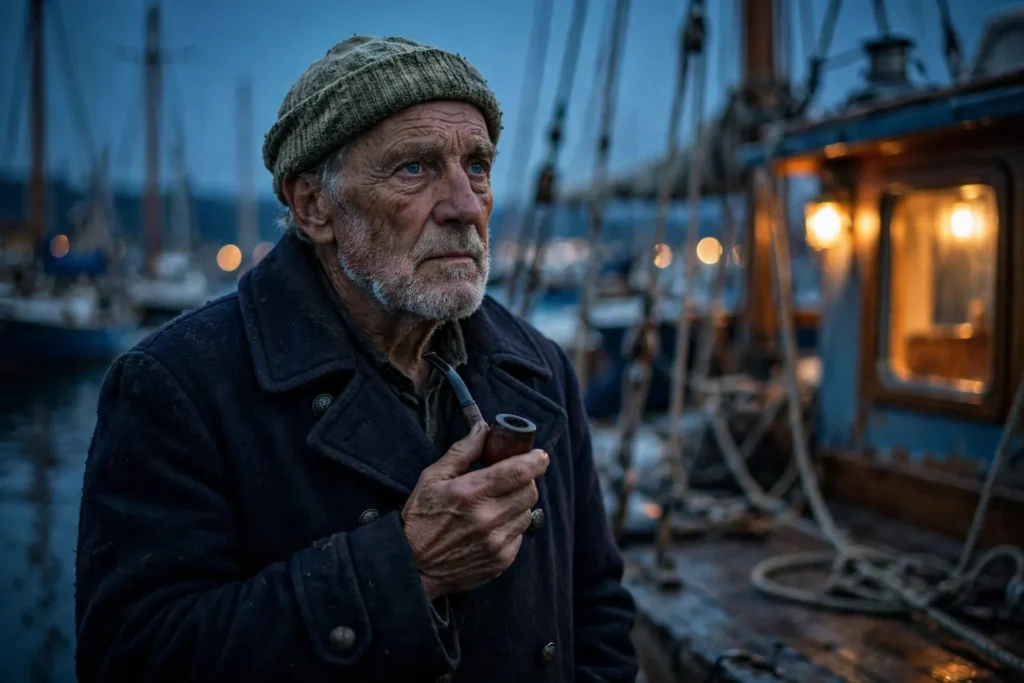
Looking for a copy-paste ready AI image prompt? Below is a complete, hand-crafted prompt for Cinematic Sailor Portrait Prompt: Weathered Character at the Harbor, tuned for Midjourney. Just copy the prompt, paste it into Midjourney, and generate.
The Prompt
Cinematic character portrait of an elderly sailor in his late sixties with a sun-weathered face, silver stubble and deep-set blue eyes, wearing a navy wool peacoat and a faded knit cap. He stands on a wooden harbor dock at blue hour, blurred masts and rigging behind him, a pipe unlit between his fingers. Cool steel-blue ambient light mixes with a warm practical lamp glow from a nearby boat cabin. Shot with an ARRI Alexa look, 40mm lens, shallow depth of field, detailed skin texture showing decades at sea, salt in his beard, contemplative faraway gaze, teal and amber cinematic color grade, film grain, ultra-detailed, 8k, sharp focus, movie-still quality character photography.
Copy the prompt above and paste it directly into Midjourney — no editing needed.
Recommended Settings
- Best tool: Midjourney
- Aspect ratio: 3:2
Negative Prompt
blurry, low quality, watermark, distorted face, deformed hands, cartoon, oversaturated, flat lighting, text
Add the negative prompt above in Midjourney’s negative prompt field to avoid common artifacts.
How to Use This Prompt
- Copy — select the prompt text above and copy it.
- Paste into Midjourney — open Midjourney and paste the prompt into the prompt box.
- Set 3:2 — choose the 3:2 aspect ratio before generating.
- Generate and refine — run 2–3 variations and keep the best one.