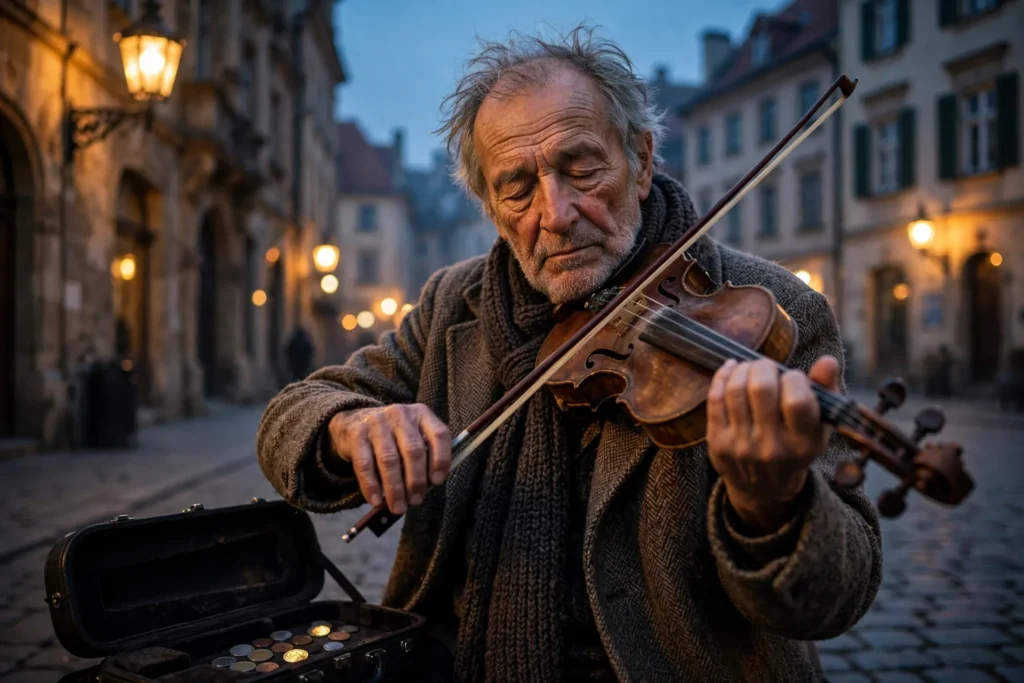
Looking for a copy-paste ready AI image prompt? Below is a complete, hand-crafted prompt for Street Violinist Portrait Prompt: Elderly Musician in Old Town, tuned for Stable Diffusion XL. Just copy the prompt, paste it into Stable Diffusion XL, and generate.
The Prompt
Poignant photorealistic portrait of an elderly street violinist in his seventies playing on a cobblestone old-town square at dusk, eyes closed in deep concentration, worn violin tucked under his chin, bow drawn mid-stroke. Warm lamplight from vintage street lanterns glows on his lined face while the blue dusk settles over historic facades behind him, a few coins glinting in an open case at his feet. Shot on a Fujifilm GFX look with an 80mm lens, shallow depth of field, nostalgic palette of amber lamplight and dusky blue, detailed wood grain of the violin and texture of his wool coat, soulful and moving mood, environmental portrait composition, ultra-detailed, 8k, sharp focus, documentary street photography.
Copy the prompt above and paste it directly into Stable Diffusion XL — no editing needed.
Recommended Settings


- Best tool: Stable Diffusion XL
- Aspect ratio: 3:2
Negative Prompt
blurry, low quality, watermark, distorted face, deformed hands, extra fingers, cartoon, oversaturated, text
Add the negative prompt above in Stable Diffusion XL’s negative prompt field to avoid common artifacts.
How to Use This Prompt
- Copy — select the prompt text above and copy it.
- Paste into Stable Diffusion XL — open Stable Diffusion XL and paste the prompt into the prompt box.
- Set 3:2 — choose the 3:2 aspect ratio before generating.
- Generate and refine — run 2–3 variations and keep the best one.