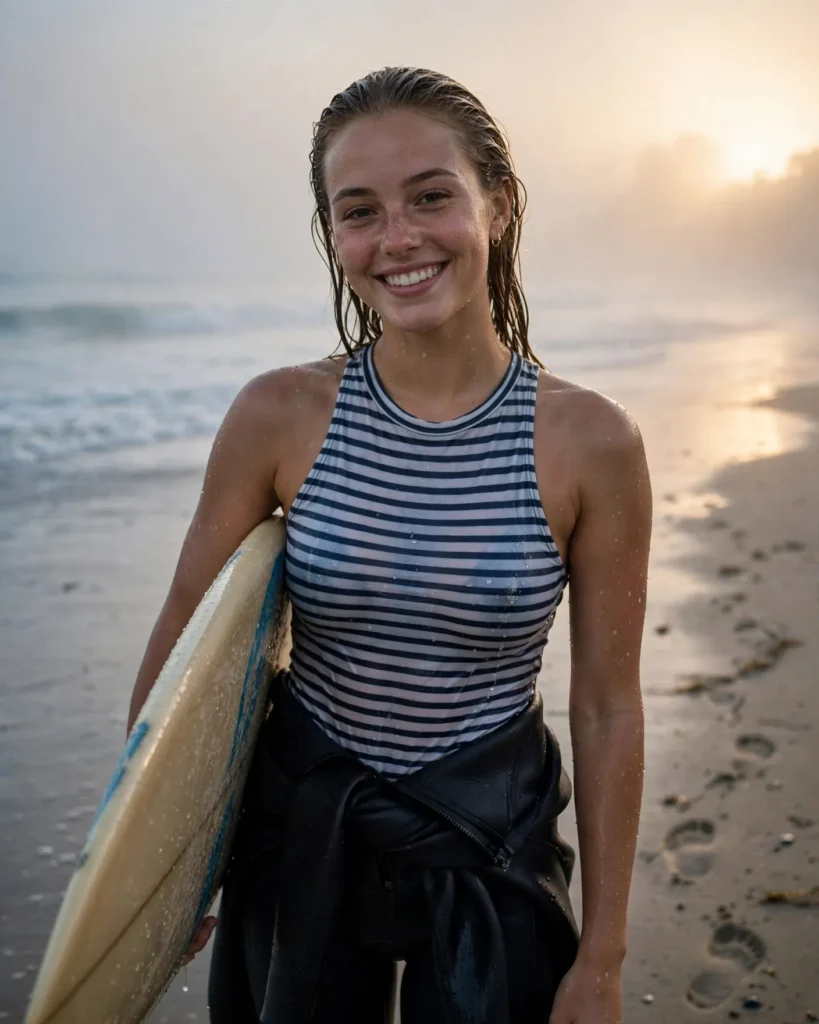
Looking for a copy-paste ready AI image prompt? Below is a complete, hand-crafted prompt for Surfer Portrait Prompt: Woman in Morning Ocean Mist, tuned for Ideogram. Just copy the prompt, paste it into Ideogram, and generate.
The Prompt
Fresh photorealistic portrait of a young female surfer in her twenties standing on a misty beach at dawn, surfboard tucked under her arm, wetsuit peeled to her waist revealing a striped rash guard, wet hair slicked back, salt water glistening on her skin. Pale gold sunrise breaks through low marine fog, soft waves rolling behind her, footprints trailing in wet sand. She smiles easily at the camera, relaxed and radiant. Shot on a Canon EOS R6 with a 50mm f/1.8 lens, shallow depth of field, cool misty blues melting into warm dawn gold, detailed water droplets, serene adventurous mood, environmental portrait composition, ultra-detailed, 8k, sharp focus, surf lifestyle photography.
Copy the prompt above and paste it directly into Ideogram — no editing needed.
Recommended Settings

- Best tool: Ideogram
- Aspect ratio: 4:5
Negative Prompt
blurry, low quality, watermark, distorted face, deformed hands, extra fingers, oversaturated, cartoon, text
Add the negative prompt above in Ideogram’s negative prompt field to avoid common artifacts.
How to Use This Prompt


- Copy — select the prompt text above and copy it.
- Paste into Ideogram — open Ideogram and paste the prompt into the prompt box.
- Set 4:5 — choose the 4:5 aspect ratio before generating.
- Generate and refine — run 2–3 variations and keep the best one.