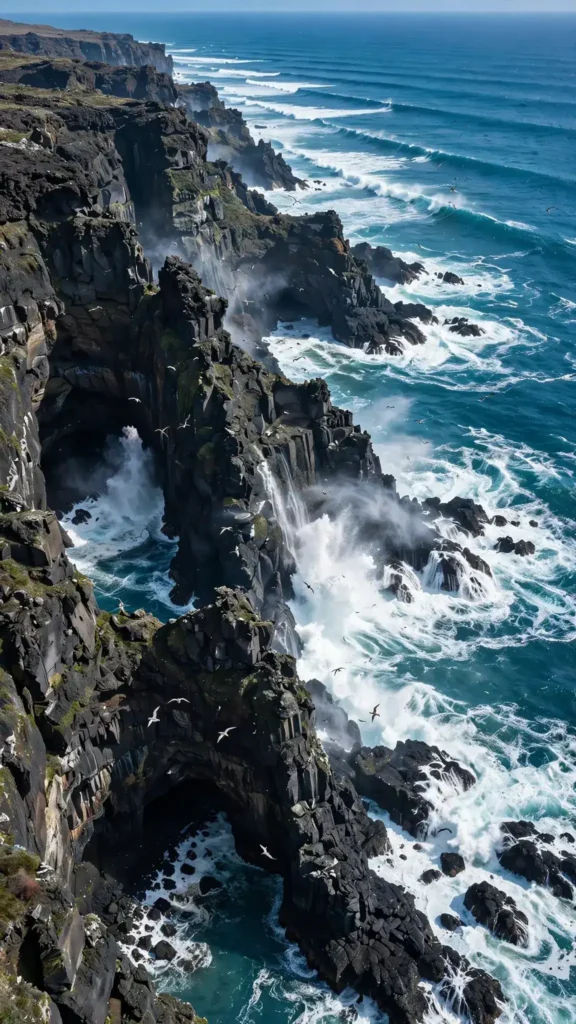
Looking for a copy-paste ready AI video prompt? Below is a complete, hand-crafted prompt for Turquoise Ocean Waves Crashing Against Sea Cliffs — Drone View, tuned for Veo 3. Just copy the prompt, paste it into Veo 3, and generate.
The Prompt
A sweeping drone-style view glides above towering sea cliffs as massive turquoise waves explode into white foam against dark volcanic rock far below. Vertical 9:16, wide 24mm lens, camera arcs smoothly sideways along the cliff line, revealing hidden coves and sea caves. Spray bursts upward and drifts in the wind, wave sets roll in rhythmic lines from the deep blue horizon, seabirds circle the cliff face. Mood is wild and exhilarating, colors of vivid teal water, charcoal rock and bright white spray under crisp midday light. Photorealistic aerial cinematography, natural wave physics, sharp 8K detail on foam and rock texture, epic vertical framing.
Copy the prompt above and paste it directly into Veo 3 — no editing needed.
Recommended Settings

- Best tool: Veo 3
- Aspect ratio: 9:16
- Duration: 14s
- Camera movement: smooth lateral drone-style arc along the cliff edge, gentle push toward the wave impact zone
- Motion: Waves surge and explode into foam against the cliffs; spray drifts on the wind; seabirds wheel along the rock face; wave lines advance from the horizon.
- Transitions: single continuous shot, no cuts
Negative Prompt
people on cliffs, boats, watermark, text, artificial wave effects, muddy colors, blurry horizon, cartoon water, low resolution
Add the negative prompt above in Veo 3’s negative prompt field to avoid common artifacts.
How to Use This Prompt

- Copy — select the prompt text above and copy it.
- Paste into Veo 3 — open Veo 3 and paste the prompt into the prompt box.
- Set 9:16 — choose the 9:16 aspect ratio before generating.
- Generate and refine — run 2–3 variations and keep the best one.