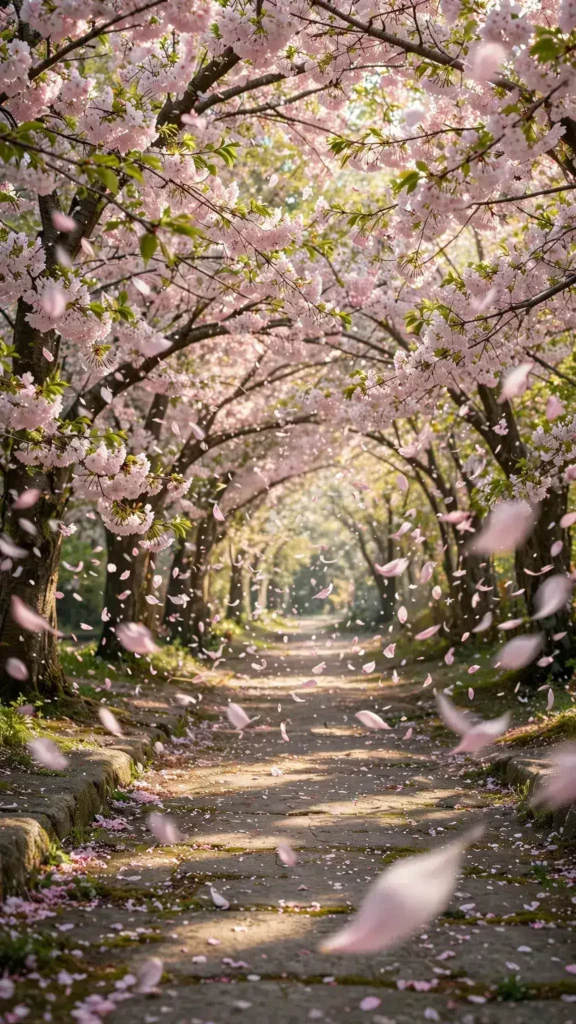
Looking for a copy-paste ready AI video prompt? Below is a complete, hand-crafted prompt for Cherry Blossom Petals Falling in the Wind, tuned for Pika. Just copy the prompt, paste it into Pika, and generate.
The Prompt
A tunnel of cherry blossom trees releases clouds of pale pink petals that swirl and cascade through the air in a gentle spring breeze, drifting over a quiet stone path. Vertical 9:16, 35mm lens, camera drifts slowly forward beneath the blossom canopy at walking pace. Petals spiral, flutter and settle on the path, branches sway softly, sunlight filters through the blossoms in warm dappled light, a petal lands and skitters along the stone. Mood is romantic and fleeting, palette of blush pink, soft white and fresh spring green. Photorealistic cinematic footage, natural petal physics, crisp 8K detail, vertical framing with the blossom tunnel drawing the eye upward.
Copy the prompt above and paste it directly into Pika — no editing needed.
Recommended Settings

- Best tool: Pika
- Aspect ratio: 9:16
- Duration: 10s
- Camera movement: slow forward drift beneath the blossom canopy at walking pace
- Motion: Petals swirl, cascade and spiral downward; branches sway; sunlight dapples through; petals settle and skitter along the stone path.
- Transitions: single continuous shot, no cuts
Negative Prompt
bare branches, watermark, text, people crowds, blurry petals, cartoon blossoms, artificial wind, muddy colors, low resolution
Add the negative prompt above in Pika’s negative prompt field to avoid common artifacts.
How to Use This Prompt


- Copy — select the prompt text above and copy it.
- Paste into Pika — open Pika and paste the prompt into the prompt box.
- Set 9:16 — choose the 9:16 aspect ratio before generating.
- Generate and refine — run 2–3 variations and keep the best one.