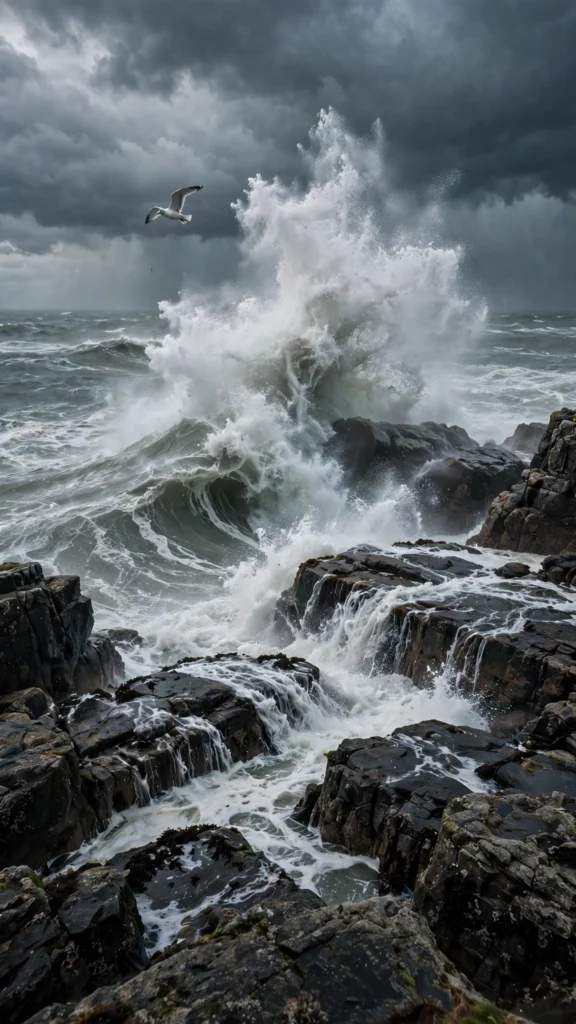
Looking for a copy-paste ready AI video prompt? Below is a complete, hand-crafted prompt for Storm Waves Exploding Against Coastal Rocks, tuned for Runway. Just copy the prompt, paste it into Runway, and generate.
The Prompt
Towering storm waves detonate against jagged coastal rocks, sending plumes of white spray rocketing skyward as the grey-green sea churns and foams. Vertical 9:16, 50mm lens, camera locked on a tripod at a safe cliff height with a slow push-in toward the impact zone. Each wave builds, crashes and erupts, spray hangs and shreds in the wind, foam races across the rock platforms, dark clouds boil overhead, a lone gull battles the gusts. Mood is raw and powerful, palette of slate grey, sea green and explosive white. Photorealistic storm cinematography, natural wave physics, crisp 8K detail on spray and rock, vertical framing with the blast zone centered.
Copy the prompt above and paste it directly into Runway — no editing needed.
Recommended Settings

- Best tool: Runway
- Aspect ratio: 9:16
- Duration: 10s
- Camera movement: locked tripod shot with a slow push-in toward the wave impact zone
- Motion: Waves build, crash and erupt into spray; foam races over rocks; clouds boil; a gull fights the wind above the chaos.
- Transitions: single continuous shot, no cuts
Negative Prompt
people, boats, watermark, text, calm sea, blurry spray, cartoon waves, artificial effects, low resolution
Add the negative prompt above in Runway’s negative prompt field to avoid common artifacts.
How to Use This Prompt


- Copy — select the prompt text above and copy it.
- Paste into Runway — open Runway and paste the prompt into the prompt box.
- Set 9:16 — choose the 9:16 aspect ratio before generating.
- Generate and refine — run 2–3 variations and keep the best one.