Looking for a copy-paste ready AI video prompt? Below is a complete, hand-crafted prompt for Heavy Snowfall in a Silent Pine Forest, tuned for Luma. Just copy the prompt, paste it into Luma, and generate.
The Prompt
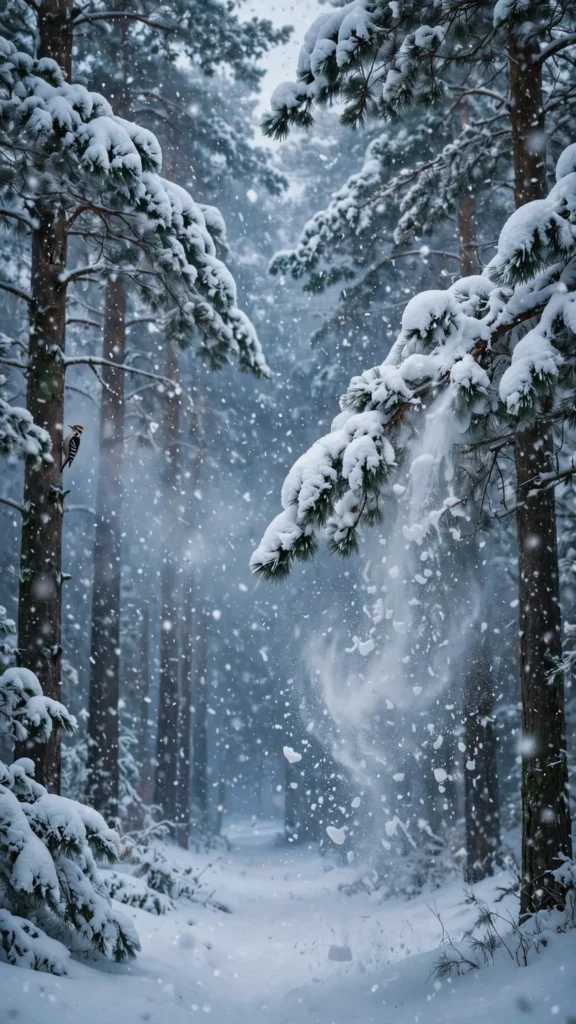
Thick snowflakes fall in heavy curtains through a silent pine forest, branches bowing under fresh white weight, the world softened into layers of blue-grey and white. Vertical 9:16, 35mm lens, camera pushes forward slowly along a snow-covered path between the pines. Snow streams off a branch in a sudden soft cascade, flakes spiral and eddy in the still air, breath-like mist hangs between the trunks, a distant woodpecker knocks faintly. Mood is hushed and peaceful, palette of cool slate blue, soft white and deep pine green. Photorealistic winter cinematography, natural snowfall physics, crisp 8K detail on flakes and bark, vertical framing with the path drawing the eye deep.
Copy the prompt above and paste it directly into Luma — no editing needed.
Recommended Settings

- Best tool: Luma
- Aspect ratio: 9:16
- Duration: 11s
- Camera movement: slow forward push along the snow-covered forest path
- Motion: Snow falls in heavy curtains; a branch releases a soft cascade; flakes spiral in still air; mist hangs between the trunks.
- Transitions: single continuous shot, no cuts
Negative Prompt
people, footprints, watermark, text, sunny weather, blurry snow, cartoon forest, artificial snow overlay, low resolution
Add the negative prompt above in Luma’s negative prompt field to avoid common artifacts.
How to Use This Prompt


- Copy — select the prompt text above and copy it.
- Paste into Luma — open Luma and paste the prompt into the prompt box.
- Set 9:16 — choose the 9:16 aspect ratio before generating.
- Generate and refine — run 2–3 variations and keep the best one.