Are you better than ChatGPT? It’s the question millions of AI users are asking in 2026 — and the direct answer is: yes, several AIs are better than ChatGPT at specific tasks. ChatGPT started the AI revolution, but it is no longer the only answer — and depending on what you need, it may not even be the best one.
Over the past year, the competition has matured dramatically. Several AI tools now outperform ChatGPT on specific, important tasks: longer documents, cited research, workplace integration, and cost-efficient coding. The honest answer to which AI is better than ChatGPT is not a single name — it depends entirely on your use case.
This AI chatbot comparison covers the top ChatGPT alternatives tested in real workflows, with a side-by-side comparison and a quick-match section to help you decide in seconds.
Quick Answer: Are You Better Than ChatGPT?
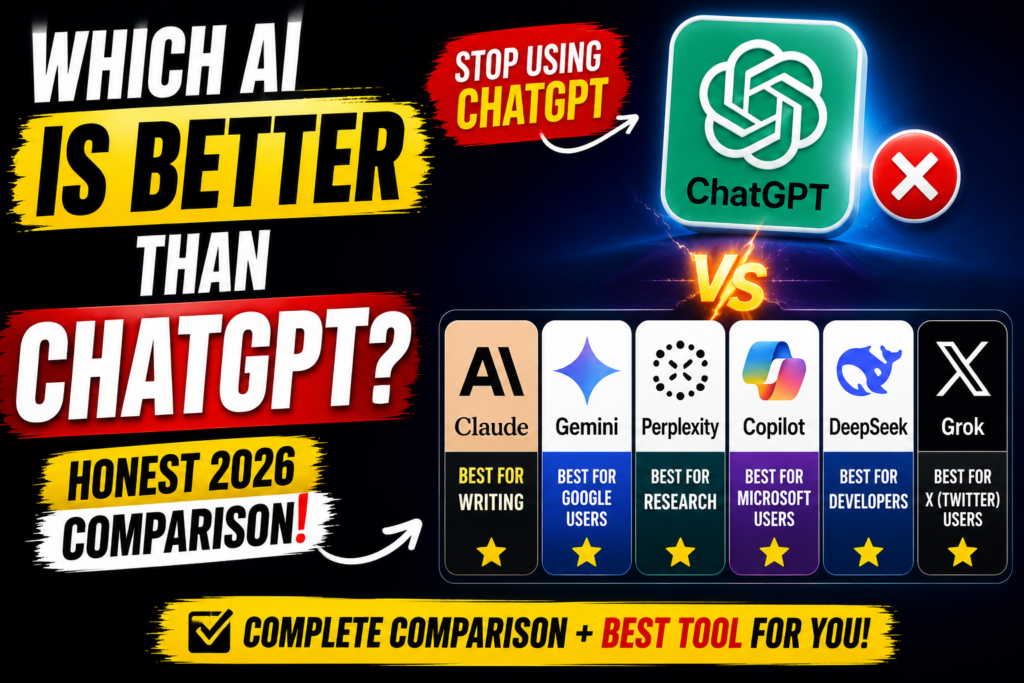
So are you better than ChatGPT? For most everyday tasks, the honest answer is: it depends on the task, not the brand. No single tool wins everything in 2026 — but almost every major use case now has a clear winner. This guide ranks the best AI chatbot 2026 contenders by what they actually do best:
- Writing and long documents → Claude
- Google Workspace work → Gemini
- Research with citations → Perplexity
- Microsoft 365 work → Copilot
- Cheap API and coding → DeepSeek
- Real-time X/Twitter trends → Grok
If you only try one alternative this week, try the one matched to your most common task above. Details, strengths, and honest limitations for each follow below.
Why People Are Looking Beyond ChatGPT

ChatGPT remains a capable and widely used tool. But as adoption grew, so did its limitations:
- Unpredictable refusals on legitimate prompts, frustrating users working on medical, legal, or historical topics.
- Context loss in long conversations, causing the model to forget earlier details.
- No source citations by default, making it harder to verify facts or use output professionally.
- Pricing — the free tier is limited, and many users feel the paid plan does not always justify the cost when alternatives offer comparable quality for free.
- Ecosystem gaps — ChatGPT does not natively integrate with Google Workspace, Microsoft 365, or other tools people use daily.
The good news: the alternatives have never been stronger. Free-tier quality has caught up with where GPT-4 was two years ago. Specialized tools now consistently beat ChatGPT on the tasks they were built for — which is exactly why the question “are you better than ChatGPT” keeps trending: users aren’t just curious, they’re actively switching.
1. Claude — Best for Writing, Long Documents & Deep Reasoning
Made by: Anthropic | Free tier: Yes | Paid plan: Claude Pro
Claude has built a reputation for responses that feel genuinely considered — less like autocomplete, more like a thoughtful draft from someone who read your entire message carefully. Its standout technical feature is a context window of up to 200,000 tokens — roughly the length of a full novel. You can upload a long contract, a research paper, or half a codebase, and Claude still remembers the beginning by the time it reaches the end.
For writers, analysts, researchers, and legal professionals, Claude consistently outperforms ChatGPT on prose quality and reasoning depth. Early 2026 benchmarks rated Claude Sonnet highest for prose quality among the three dominant free chatbots. Its approach to safety — built around what Anthropic calls Constitutional AI — also makes it more transparent and less prone to arbitrary refusals.
Where Claude beats ChatGPT:
- Summarizing and analyzing long documents (reports, contracts, books)
- Long-form writing with consistent tone and structure
- Complex multi-step reasoning tasks
- Understanding nuanced instructions without constant reprompting
Limitation:
Claude does not generate images. Web search is available but not its core strength.
Want more options? See our roundup of the best free AI chatbots tested this year.
2. Google Gemini — Best for Google Workspace Users

Made by: Google | Free tier: Yes | Paid plan: Google AI Plus ($7.99/month)
Gemini is the closest one-to-one substitute for ChatGPT if you live inside the Google ecosystem. It integrates natively with Gmail, Docs, Drive, Calendar, and Search — meaning it can reference your actual documents, suggest edits directly in Google Docs, and pull live information from the web without switching tabs.
Gemini’s free tier is widely regarded as the most capable free offering in 2026, often matching or exceeding ChatGPT Plus on everyday tasks at no cost. For most people, that makes Gemini the strongest free ChatGPT alternative available right now. Its multimodal capabilities — accepting image, video, and audio input — are best-in-class at the free tier. For math-heavy work, system design, or debugging, Gemini handles complex multi-step problems without losing context.
Where Gemini beats ChatGPT:
- Native integration with Gmail, Google Docs, and Drive
- Real-time web access built into every response
- Image and video generation (Imagen models)
- Stronger free tier for most everyday tasks
Limitation:
Outside Google’s ecosystem, Gemini loses most of its advantage. It is not the best choice for standalone creative work or deep technical analysis outside Google tools.
3. Perplexity AI — Best for Research & Cited Answers
Made by: Perplexity AI | Free tier: Yes | Paid plan: Perplexity Pro
Most AI chatbots have a confidence problem — they deliver uncertain information with the same assured tone as a verified fact, and the burden falls on you to double-check everything. Perplexity takes the opposite approach.
Built around real-time web search rather than static training data, Perplexity delivers every answer with cited sources attached, so you can see exactly where the information came from. Think of it as a smarter search engine: you ask in natural language, it searches and synthesizes, and every claim is linked. For students, journalists, and researchers, this makes it far more trustworthy than ChatGPT for factual work.
When accuracy matters more than fluency, asking “are you better than ChatGPT” gets a clear yes — Perplexity’s cited answers beat ChatGPT’s uncited ones for anything factual.
Where Perplexity beats ChatGPT:
- Every answer includes verifiable, linked citations
- Real-time web search on every query
- Research synthesis and fact-checking
- Fast and free at the basic level
Limitation:
Perplexity is better at research synthesis than open-ended creative generation or complex coding. It is a research tool, not a full ChatGPT replacement for every use case.
4. Microsoft Copilot — Best for Microsoft 365 Users
Made by: Microsoft (powered by OpenAI) | Free tier: Yes (via Windows, Edge, Bing) | Paid plan: Microsoft 365 Copilot
Copilot runs on the same underlying OpenAI models that power ChatGPT, so the raw intelligence is comparable. What is different is context: Copilot knows your files, emails, calendar, and colleagues. It can summarize an email thread, draft a Word document using data from your Excel sheet, and pull action items from your last Teams meeting.
That workplace awareness makes Copilot considerably more useful than a generic chatbot for office tasks. The honest trade-off: outside the Microsoft ecosystem, Copilot loses almost everything that makes it special. It is a workplace productivity tool — and at that specific job, it excels.
Where Copilot beats ChatGPT:
- Reads and references your actual Word, Excel, and Outlook files
- Understands your calendar and meeting history
- Integrated directly into Teams, Word, and PowerPoint
- Free access via Windows and Edge
Limitation:
Almost no advantage for users outside the Microsoft 365 ecosystem. Not recommended for creative work, research, or general exploration.
5. DeepSeek — Best for Developers & Cost-Sensitive API Work
Made by: DeepSeek | Free tier: Yes | API pricing: Significantly lower than OpenAI
DeepSeek made a significant impact in early 2025 with models that rivaled frontier performance at a fraction of the API cost. For developers building applications or processing large volumes of code, DeepSeek offers competitive reasoning and coding performance without OpenAI’s pricing premium.
Its open-weight models can be self-hosted, which matters for teams handling sensitive data that cannot be sent to a third-party cloud. For coding-focused workflows, DeepSeek is worth serious consideration alongside Claude and GitHub Copilot.
Where DeepSeek beats ChatGPT:
- Dramatically lower API costs for high-volume workloads
- Strong performance on coding and reasoning tasks
- Open-weight models available for self-hosting
- No usage caps for local deployments
Limitation:
Data privacy concerns for sensitive enterprise use. Fewer third-party integrations than established Western alternatives.
6. Grok — Best for X (Twitter) Users
Made by: xAI | Free tier: Limited | Full access: X Premium subscription
Grok has one advantage no other AI on this list can match: real-time access to the X/Twitter platform. If your work involves monitoring social sentiment, tracking trending discussions, or understanding what is happening on X right now, Grok is the natural choice. Outside the X ecosystem, it is less compelling than Claude or Gemini as a general-purpose assistant.
Side-by-Side Comparison: AI Alternatives to ChatGPT (2026)
This ChatGPT vs other AI table summarizes where each tool wins, so you can compare at a glance:
| AI Tool | Best Use Case | Free Tier | Cites Sources | Standout Feature |
|---|---|---|---|---|
| ChatGPT | General purpose | Yes | Partial | Widest plugin ecosystem |
| Claude | Writing, docs, reasoning | Yes | Partial | 200K token context window |
| Gemini | Google Workspace users | Yes | Yes | Native Google app integration |
| Perplexity | Research & fact-checking | Yes | Always | Every answer cites its source |
| Copilot | Microsoft 365 users | Yes | Partial | Reads your files & emails |
| DeepSeek | Developers / API use | Yes | No | Very low API cost, self-hostable |
| Grok | X/Twitter monitoring | Limited | Partial | Real-time X platform access |
How to Choose the Right AI for Your Needs
Still asking “are you better than ChatGPT” for your specific workflow? Rather than searching for “the single best AI,” start by identifying your most common task or biggest frustration with ChatGPT. That makes the decision much simpler:
- You write a lot or work with long documents → Use Claude
- You use Gmail, Google Docs, or Drive daily → Use Gemini
- You need accurate, verifiable information → Use Perplexity
- You live in Word, Excel, and Teams → Use Copilot
- You’re a developer watching API costs → Use DeepSeek
- You track trends on X/Twitter → Use Grok
The most effective AI users in 2026 are not loyal to a single tool. They build a small personal stack — one general-purpose chatbot, one research or productivity tool, and sometimes a self-hosted option for sensitive data. That approach beats any single-tool setup for almost every workflow.
To expand your stack, explore our AI writing tools guide for content creation, or jump straight into our free AI chat to test a chatbot right now.
For long-form writing, document analysis, and tasks requiring large context windows, yes — Claude consistently outperforms ChatGPT in independent benchmarks and real-world testing as of 2026. For general-purpose use involving plugins, image generation, or the broadest integrations, ChatGPT remains competitive.
Final Verdict: Are You Better Than ChatGPT?
So, are you better than ChatGPT? There is no single winner — and that is actually good news. The AI landscape in 2026 has matured to the point where specialized tools outperform ChatGPT on the tasks they were built for. Claude wins on writing and reasoning. Gemini wins for Google Workspace users. Perplexity wins on research. Copilot wins inside Microsoft 365. DeepSeek wins on cost for developers.
The smartest move is to stop asking “which AI is best overall” and start asking “which AI is best for this specific task.” Use this AI assistant comparison as your shortlist: build a small toolkit of two or three tools, use each for what it does well, and you will outperform any single-tool approach.
All of the tools mentioned in this article have free tiers — so there is no reason not to test a few yourself. You can start right now with try AI chat free on this site.