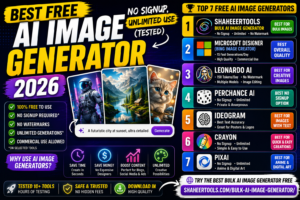
Imagine needing 50 unique AI-generated images for your blog, social media campaign, or creative project — and getting them all done in under 5 minutes, completely free. Sounds too good to be true? With the ShaheerTools Bulk AI Image Generator, that’s exactly what you get.
Most AI image tools make you sign up, pay for credits, or wait in long queues. shaheertools.com/ built a different kind of tool — one that lets you generate bulk AI images instantly, without any API key, without any account, and without spending a single dollar.
In this guide, you’ll learn exactly what the tool does, why it’s better than alternatives, and how to use it step by step to supercharge your creative workflow.
What Is a Bulk AI Image Generator?
A bulk AI image generator is a tool that lets you create multiple AI-generated images simultaneously from text prompts. Instead of typing one prompt, waiting, downloading, then repeating — you enter multiple prompts at once and get all results in one go.
This is especially powerful for:
- Content creators who need images for multiple blog posts at once
- Social media managers running multi-platform campaigns
- E-commerce sellers who need product mockup variations
- Developers testing AI image pipelines
- Artists exploring creative concepts in bulk
Traditional tools like Midjourney or DALL-E generate one image per prompt, which becomes incredibly time-consuming when you need dozens or hundreds of visuals. A bulk generator eliminates that bottleneck entirely.
ShaheerTools Bulk AI Image Generator — Key Features
The Bulk AI Image Generator on shaheertools.com/ stands out from every other tool in the market. Here’s what makes it unique:
| Feature | Details |
|---|---|
| ✅ 100% Free | No hidden charges, no premium plans required |
| ✅ No Sign-Up Required | Start generating images immediately — no account needed |
| ✅ No API Key Needed | Powered by Pollinations.ai — zero configuration required |
| ✅ Bulk Generation | Submit multiple prompts and get all images at once |
| ✅ Custom Image Sizes | Choose width and height for each batch |
| ✅ Instant Download | Download individual images or all at once |
| ✅ Clean & Fast UI | Simple interface, works on all devices including mobile |
| ✅ No Watermarks | All generated images are clean and ready to use |
How to Use the Bulk AI Image Generator — Step-by-Step Guide
Using ShaheerTools’ bulk image generator is incredibly simple. Follow these steps to generate your first batch of AI images:
Step 1: Open the Tool
Visit shaheertools.com/ and navigate to the Bulk AI Image Generator. No login screen, no pop-ups — you land directly on the tool.
Checkout this tool : Bulk Mockup Genrator Tool
Step 2: Enter Your Prompts
Type or paste your image prompts in the input area. You can add one prompt per line. The more descriptive your prompts, the better your results. For example:
📝 Example Prompts
A futuristic city at sunset, cyberpunk style, ultra detailed
A cute golden retriever puppy playing in autumn leaves, photorealistic
Abstract watercolor painting, blue and gold tones, minimalist
Step 3: Set Image Dimensions
Choose your preferred image width and height. Common sizes include:
- 512×512 — Square (perfect for social media)
- 1024×576 — Widescreen (great for blog headers)
- 768×1024 — Portrait (ideal for Pinterest & Instagram Stories)
Step 4: Click Generate
Hit the Generate button. The tool processes all your prompts simultaneously and displays images as they are ready. No waiting in queue — results appear progressively.
Step 5: Download Your Images
Once generated, you can download images one by one or use the Download All option to save the entire batch instantly. Images are delivered in high-quality format with no watermarks.
🚀 Ready to Generate Bulk AI Images?
No sign-up. No API key. 100% Free.
ShaheerTools vs Other AI Image Generators
There are dozens of AI image tools available today. Here’s an honest comparison of why ShaheerTools wins for bulk generation:
| Feature | ShaheerTools | Midjourney | DALL-E 3 | Adobe Firefly |
|---|---|---|---|---|
| 100% Free | ✅ Yes | ❌ Paid | ❌ Paid | ⚠️ Limited |
| No Sign-Up | ✅ Yes | ❌ No | ❌ No | ❌ No |
| Bulk Generate | ✅ Yes | ❌ One at a time | ❌ One at a time | ❌ No |
| No API Key | ✅ Yes | ❌ Required | ❌ Required | ❌ Required |
| No Watermarks | ✅ Yes | ⚠️ On free plan | ✅ Yes | ⚠️ Sometimes |
| Mobile Friendly | ✅ Yes | ⚠️ App only | ✅ Yes | ✅ Yes |
As you can see, ShaheerTools is the only tool that offers bulk generation for completely free with no registration. No other platform comes close for this specific use case.
Best Use Cases for Bulk AI Image Generation
Whether you’re a solo creator or running a business, here are the most powerful ways to use the ShaheerTools Bulk AI Image Generator:
🖊️ Bloggers & Content Marketers
Generate unique, eye-catching featured images for every blog post. Instead of using the same stock photos as everyone else, create custom AI visuals that match your brand perfectly.
📱 Social Media Creators
Need 30 posts worth of visuals for the month? Generate them all in one session. Perfect for Instagram, Facebook, Pinterest, and LinkedIn content calendars.
🛒 E-Commerce & Product Sellers
Create lifestyle mockups, product backgrounds, and promotional banners without hiring a photographer or designer.
🎬 YouTube Thumbnail Creators
Generate multiple thumbnail concept variations quickly and test which performs best on your channel.
🎮 Game Developers & App Designers
Produce concept art, character sketches, and environment visuals at scale during early development phases.
📚 Teachers & Educators
Create custom illustrations for presentations, worksheets, and educational materials in minutes.
🎨 NFT Artists
Generate large collections of AI art variations for NFT projects without expensive GPU setups.
Pro Tips for Writing Better AI Image Prompts
The quality of your AI-generated images depends heavily on your prompts. Here are expert tips to get stunning results every time:
- Be specific about style: Add terms like “photorealistic,” “oil painting,” “anime style,” “cinematic lighting,” or “watercolor illustration.”
- Include lighting details: Words like “golden hour,” “neon lights,” “soft bokeh background,” or “studio lighting” dramatically improve results.
- Specify composition: Use phrases like “close-up portrait,” “bird’s eye view,” “wide angle shot,” or “macro photography.”
- Add quality modifiers: Include “ultra detailed,” “4K,” “highly detailed,” “sharp focus,” or “masterpiece” to boost image quality.
- Reference art styles: Try “in the style of Van Gogh,” “Pixar-style 3D render,” or “Studio Ghibli anime” for distinct aesthetics.
- Describe what you WANT: AI responds better to positive descriptors than to negative ones — focus on the result you desire.
💡 Quick Prompt Formula
[Subject] + [Setting/Environment] + [Art Style] + [Lighting] + [Quality Modifier]
Example: “A majestic lion on African savanna, golden hour, photorealistic, 4K ultra detailed”
Yes, 100% free. There are no hidden fees, no credit system, and no premium tier. Every feature is available to all users at no cost.
Conclusion — Start Generating Bulk AI Images for Free Today
The ShaheerTools Bulk AI Image Generator is one of the most powerful free tools available for creators, marketers, developers, and artists. While most platforms lock bulk generation behind expensive subscriptions, ShaheerTools gives you everything for free — no sign-up, no API key, no limits.
Whether you need 5 images or 500, this tool saves you hours of manual work and hundreds of dollars in design costs. The clean interface, instant results, and zero barriers make it the go-to choice for bulk AI image generation in 2025 and beyond.
Ready to see it in action? Head to shaheertools.com/ right now, enter your first batch of prompts, and watch dozens of unique AI images come to life in seconds.
Generate Unlimited AI Images — Free
No account. No API key. No cost. Just your creativity.