
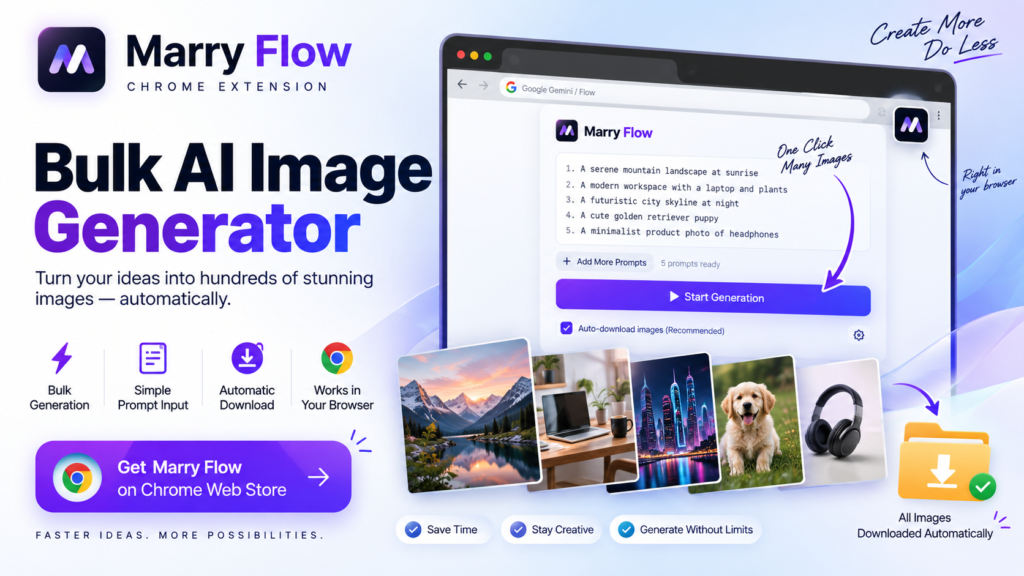
Generate AI Images in Bulk & Auto-Download Them with Marry Flow
Generating one AI image is easy. Generating 50, 100, or more can become a completely different experience.
The frustrating part is rarely the creative idea. It is the repetition: enter a prompt, start generation, wait, download the result, and then do it all over again.
That is the problem a free bulk AI image generator workflow is meant to solve.
Instead of treating every image as a separate task, you can turn a list of prompts into a repeatable process. Marry Flow, a Chrome extension created by Shaheer, is built around that idea: automate repetitive AI image-generation actions and automatically download the generated results.
The goal is simple. You spend more time creating prompts and less time clicking buttons.
What Is a Free Bulk AI Image Generator?
A free bulk AI image generator is a workflow or tool designed to help you create multiple AI-generated images from multiple prompts instead of generating every image individually.
Think of it like an assembly line.
A manual workflow handles one image from start to finish before moving to the next. A bulk workflow lets you prepare the work upfront, process multiple prompts, and reduce the repetitive steps between each result.
This matters because the need for visual content is growing across many types of projects. Content creators may need social graphics, bloggers may need article visuals, marketers may need campaign variations, and online sellers may need multiple product images.
When every image requires the same sequence of clicks, the process can quickly become the bottleneck.
Why Bulk AI Image Generation Is Useful
Competitors in this space consistently position bulk generation around three ideas: volume, automation, and speed.
BulkImageGeneration.com, for example, focuses on generating large numbers of professional images and promotes bulk generation, automated prompt engineering, batch editing, and consistent style variations. BulkImagen takes a similar approach, positioning itself around generating a whole batch rather than producing one-off images.
The pattern is clear: people looking for bulk AI image generation do not simply want another image generator. They want a faster workflow for producing many images.
And that raises an important question:
Why should you manually repeat the same task dozens of times when the workflow itself can be automated?
That is where Marry Flow takes a different approach.
Marry Flow: A Chrome Extension for Bulk AI Image Generation
Marry Flow is a Chrome extension created by Shaheer to simplify repetitive AI image-generation workflows.
Rather than building the experience around a separate spreadsheet-heavy workflow, Marry Flow is designed to work directly in the browser.
The core idea is straightforward:
Add multiple prompts → run the workflow → generate images → automatically download the results.
This makes Marry Flow particularly relevant for people searching for a Chrome extension for AI image automation, a batch AI image generator, or a way to generate AI images in bulk without manually repeating every step.
The focus is not simply on producing more images.
It is on making the process of producing them less repetitive.
The Two Problems Marry Flow Focuses On
Bulk image workflows usually have two repetitive parts.
1. Repeated Prompt Submission
Generating multiple images manually means repeatedly entering or submitting prompts.
For a small batch, that may not feel like a problem. Once the number of prompts increases, however, the process becomes tedious.
Marry Flow turns the prompts into a workflow that can be processed in sequence.
2. Repeated Image Downloading
Generating the images is only half the job.
After the images are ready, you still need to save them.
That final step is easy to overlook, but it creates another cycle of clicking and checking. Marry Flow includes automatic downloading so the workflow does not stop at generation.
This is an important distinction: automation is more useful when it covers the repetitive work surrounding generation, not just the generation step itself.
How Marry Flow Works
The workflow can be thought of as three simple stages.
Step 1: Prepare Your Prompts
Start with the prompts you want to turn into images.
For example:
A minimalist coffee shop interior in warm morning light

A futuristic city skyline at night with cinematic lighting

A professional creator working at a modern desk

A colorful illustrated space station above a distant planet

A clean product advertisement with a premium studio look
Instead of handling each prompt separately, you prepare them as a batch.
Step 2: Start the Flow
Load your prompts into Marry Flow and start the workflow.
The extension is designed to automate the repetitive interactions involved in processing those prompts, reducing the need to manually repeat the same actions for every image.
Step 3: Let the Results Download Automatically
Once the images are generated, Marry Flow can automatically download the results.
That means you are not left with another manual task after generation.
The complete workflow becomes closer to:
Prompt list → generation → downloads
rather than:
Prompt → click → wait → download → repeat → repeat → repeat
Free Bulk AI Image Generator vs. Manual Generation
The biggest advantage of a bulk workflow is not a magic increase in image quality.
It is the reduction of repetitive work.
Here is the difference:
| Workflow | Manual Process | Marry Flow Workflow |
|---|---|---|
| Prepare prompts | One at a time | Multiple prompts prepared together |
| Submit prompts | Repeated manually | Processed through a flow |
| Monitor workflow | Frequent manual interaction | Reduced repetitive interaction |
| Download results | Download individually | Automatic downloading |
| Large batches | More repetitive | More streamlined |
The exact experience will depend on the AI image platform being used, but the underlying benefit remains the same: less repetitive interaction.
Why a Chrome Extension Can Be a Better Workflow
Many bulk AI tools approach automation as a separate web application.
Some focus on spreadsheets or CSV files. BulkImagen, for example, emphasizes list and spreadsheet-style batch input, while Google Flow Automator promotes queues, CSV or Google Sheets imports, and automatic downloads.
Those are valid approaches, but they also reveal an opportunity.
Not every creator wants to build a spreadsheet workflow just to generate a batch of images.
Sometimes you simply want to open your browser, provide your prompts, and start the process.
That is the space Marry Flow is designed to address.
As a Chrome extension, it brings the automation closer to the browser workflow instead of requiring you to think about the process as a separate production system.
Who Can Benefit From Bulk AI Image Generation?
You do not need to run a large company to benefit from bulk image generation.
Content Creators
Creators can prepare a batch of visual ideas for social media, posts, videos, or other content.
Instead of generating each visual individually, they can organize their prompts first and then process them as a group.
Bloggers
A blog may require multiple featured graphics, illustrations, or supporting visuals.
A bulk workflow can make it easier to produce those assets without manually repeating the same process for every article.
Marketers
Marketing teams often need several creative variations for campaigns.
Bulk AI image generation makes it easier to work through a larger set of visual concepts.
Designers
Designers can use batches of AI-generated visuals for exploration, concepts, backgrounds, and creative experimentation.
AI Creators
Anyone who regularly experiments with AI image generation can benefit from removing repetitive browser actions from their workflow.
Generate AI Images in Bulk Without a Spreadsheet
One of the recurring approaches in this market is spreadsheet-based batch generation.
BulkImagen highlights CSV and spreadsheet input, while Google Flow Automator supports importing prompts from CSV files or Google Sheets.
That works well when your workflow is already organized around spreadsheets.
But what about users who simply have a list of prompts?
That is where a simpler approach can be valuable.
With Marry Flow, the focus is on taking your prompts and running them through a browser-based flow rather than making the spreadsheet itself the center of the experience.
The idea is not to make your workflow more complicated just because you want to generate more images.
Automatic Downloading: The Step People Forget
Imagine finishing a long generation run and realizing you still need to save every image manually.
That is like printing 100 pages and then manually scanning each page back into your computer.
The generation step may be automated, but the workflow still contains friction.
Automatic downloading removes that final repetitive step.
This is also an area where competitors clearly recognize user demand. Google Flow Automator specifically promotes automatic image downloads as part of its workflow.
For Marry Flow, automatic downloading is therefore more than a convenience feature. It is part of the larger idea of end-to-end workflow automation.
How to Get Better Results From Bulk AI Image Generation
Automation can make the workflow faster, but it cannot replace thoughtful prompting.
Your batch is only as useful as the prompts behind it.
Be Specific
Instead of writing:
A business image
try something more descriptive:
A professional working at a laptop in a modern minimalist office, natural lighting, clean corporate aesthetic.
The second prompt communicates a much clearer visual direction.
Keep Similar Prompts Consistent
When creating a series, use a similar structure across prompts.
You can change the subject, environment, or concept while maintaining the overall visual direction.
This is especially useful when you want your batch to feel like a collection rather than a random group of images.
Organize Before You Generate
Do not start with dozens of unorganized ideas.
Group your prompts by project or purpose first.
For example:
Social Media → Blog → Marketing → Product → YouTube
A little organization before generation can make managing the results much easier afterward.
Marry Flow’s Place in the Bulk AI Image Generator Market
The current bulk-image-generation landscape shows several approaches.
Some platforms focus on generating large numbers of images through dedicated web applications.
Some emphasize spreadsheet or CSV workflows.
Others, such as browser extensions for Google Flow, focus on queues, automation, and automatic downloading.
Marry Flow fits into this broader category but emphasizes a particularly straightforward concept:
bulk image generation inside your browser, with automation and automatic downloads.
That positioning gives it a clear opportunity to appeal to users who are not looking for a complicated production system. They simply want a way to turn multiple prompts into multiple images with fewer repetitive actions.
Frequently Asked Questions
What is a free bulk AI image generator?
A free bulk AI image generator is a tool or workflow that helps users generate multiple AI images from multiple prompts rather than creating each image individually.
How do I generate AI images in bulk?
Prepare multiple prompts, process them through a bulk-generation workflow, and allow the workflow to handle the repeated generation steps. With Marry Flow, the process is designed around prompt batches and automatic downloading.
Is Marry Flow a Chrome extension?
Yes. Marry Flow is a Chrome extension created by Shaheer for automating repetitive AI image-generation workflows.
Can Marry Flow automatically download AI-generated images?
Yes. Automatic downloading is one of Marry Flow’s core workflow features.
Is Marry Flow useful for beginners?
The concept is designed to be straightforward: prepare your prompts, start the flow, and let the repetitive workflow run. That makes it suitable for users who want automation without turning image generation into a complicated technical process.
Who should use a bulk AI image generator?
Bulk generation can be useful for content creators, bloggers, marketers, designers, educators, and anyone who regularly needs multiple AI-generated visuals.
Does bulk generation replace good prompting?
No. Automation helps with workflow efficiency, while prompt quality still determines what you ask the image generator to create.
The Future of AI Image Generation Is Not Just Better Images
AI image generators continue to make visual creation easier.
But as generation becomes easier, another problem becomes more noticeable: workflow friction.
When creating five images, manual repetition may be acceptable.
When creating dozens, it becomes a process that deserves automation.
That is why tools built around queues, bulk prompts, browser automation, and automatic downloads are gaining attention in this space.
The next step is not necessarily finding a tool that makes you click faster.
It is finding a workflow that requires you to click less.
Final Takeaway
The value of a free bulk AI image generator is not simply that it can create multiple images.
The real value is what happens around those images.
You can prepare prompts in batches, reduce repetitive generation steps, and automatically download the results instead of manually saving every image.
Marry Flow, created by Shaheer, takes that idea into the browser with a Chrome extension focused on bulk AI image generation and automatic downloads.
So the next time you have a long list of image prompts, do not ask yourself how quickly you can repeat the same clicks.
Ask a better question:
Why repeat them at all?
Start with your prompt list, run your workflow with Marry Flow, and spend your time on the creative work that actually matters.
